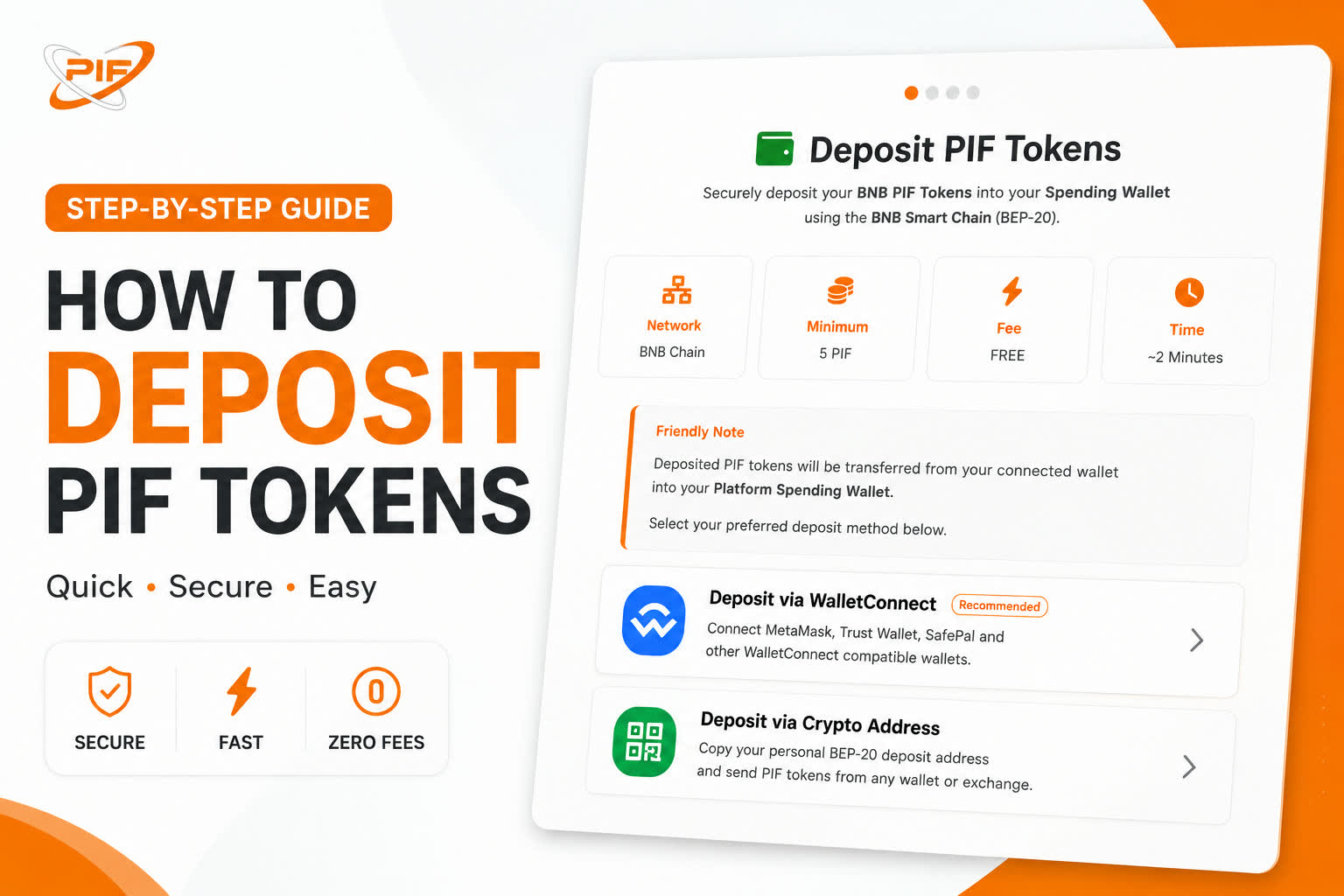
Depositing PIF tokens into your spending account is quick, secure, and designed for both beginners and experienced crypto users.
At the moment, PIF deposits are supported exclusively on the Binance Smart Chain (BNB Chain), offering fast confirmations and low transaction fees. Support for additional blockchain networks, including Ethereum and Polygon, is planned for future updates.
This guide will walk you through everything you need to know before making your first deposit.
Why Deposit PIF Tokens?
Once deposited, your PIF tokens are added to your Platform Spending Wallet, allowing you to:
✅ Purchase PIF Token Draw tickets
✅ Boost your posts
✅ Create banner advertisements
✅ Support donation campaigns
✅ Access premium platform features
✅ Participate in future platform utilities
Supported Network 🌐
Currently, TheBenefactor supports deposits on:
🟡 Binance Smart Chain (BNB Chain)
- Fast transaction confirmations
- Low network (gas) fees
- Reliable and widely supported
- Uses the BEP-20 version of the PIF Token
🚀 More networks are coming soon!
We plan to support Ethereum (ERC-20) and Polygon in future releases, giving users even more flexibility.
Choose Your Deposit Method
You can deposit PIF tokens in one of two ways.
🔗 Option 1: Deposit with WalletConnect
If you use another Web3 wallet such as:
- Trust Wallet
- MetaMask
- Coinbase Wallet
- OKX Wallet
- TokenPocket
- SafePal
- Any WalletConnect-compatible wallet
simply:
- Click Deposit with Wallet.
- Scan the QR code or choose your wallet.
- Approve the connection.
- Enter your deposit amount.
- Confirm the transaction.
Your balance will update automatically after confirmation.
📥 Option 2: Deposit via Wallet Address
If you’re sending PIF from an exchange or another wallet, you can use your personal deposit address.
Steps
- Select Deposit via Address.
- Copy your unique BNB Chain deposit address.
- Open your exchange or wallet.
- Send your BEP-20 PIF tokens to the copied address.
- Wait for blockchain confirmation.
Your tokens will automatically appear in your Platform Spending Wallet once confirmed.
Deposit Requirements 📋
Minimum Deposit
The minimum deposit amount is 5 PIF Tokens
Deposits below this amount may not be processed.
Platform Fees
🎉 TheBenefactor charges absolutely ZERO deposit fees.
If you deposit 100 PIF, you’ll receive 100 PIF in your Platform Spending Wallet.
The only fee you’ll pay is the standard BNB Chain gas fee, which is paid directly to the blockchain network — not to TheBenefactor.Net.
You’ll need a small amount of BNB in your wallet to complete the transaction.
Processing Time ⏱️
Most deposits are confirmed within a few seconds to a couple of minutes, depending on current BNB Chain network activity.
Once your transaction is confirmed:
✅ Your Platform Spending Wallet is updated automatically.
✅ You’ll receive a confirmation email notifying you that your deposit has been successfully credited.
Security Tips 🔒
To keep your funds safe:
- ✅ Always verify your deposit address before sending.
- ✅ Make sure you’re sending BEP-20 PIF tokens.
- ✅ Keep enough BNB in your wallet for gas fees.
- ✅ Never share your wallet’s private key or recovery phrase.
- ✅ Double-check every transaction before confirming.
⚠️ Common Mistakes to Avoid
Avoid these common errors:
❌ Sending tokens on the wrong blockchain.
❌ Sending tokens that aren’t BEP-20 PIF.
❌ Depositing less than 5 PIF.
❌ Copying the wrong deposit address.
❌ Forgetting to keep enough BNB for gas fees.
Taking a few extra seconds to verify your transaction can prevent permanent loss of funds.
Frequently Asked Questions
Do you charge deposit fees?
No. Depositing PIF tokens on TheBenefactor.Net is completely free. You only pay the standard BNB Chain gas fee required by the blockchain.
What is the minimum deposit?
The minimum deposit is 5 PIF tokens.
How long do deposits take?
Most deposits are completed within a few seconds or minutes after the transaction is confirmed on the BNB Chain.
How will I know when my deposit is successful?
Your Platform Spending Wallet will update automatically, and you’ll receive a confirmation email.
Can I deposit from Binance or another exchange?
Yes. Simply copy your personal deposit address and withdraw your BEP-20 PIF tokens from your exchange to that address.
Can I deposit ERC-20 or Polygon PIF tokens?
Not yet.
Currently, only BEP-20 PIF tokens on BNB Chain are supported. Support for Ethereum (ERC-20) and Polygon is planned for future updates.
Final Thoughts 🧡
Depositing PIF tokens into your spending account is designed to be fast, secure, and beginner-friendly. Whether you’re connecting a Web3 wallet or transferring tokens from an exchange, your funds are automatically credited once the transaction is confirmed on the BNB Chain.
As TheBenefactor.Net continues to grow, we’ll introduce support for additional blockchain networks, making it even easier to manage your PIF tokens. Until then, always ensure you’re sending BEP-20 PIF tokens on the BNB Chain for a smooth, secure deposit experience. 🚀